
Download Cobra Print Viewer – Free, Secure & Lightweight Printer Queue Viewer for Windows
Streamline Your Printing Workflow with Cobra Print Viewer
Cobra Print Viewer is a lightweight yet powerful utility tool designed specifically for Windows users who frequently interact with their print queues. Developed by Cobra Apps, this software fills a critical gap in the standard Windows printing experience—visual clarity. By default, Windows only displays text filenames of documents waiting to be printed, making it nearly impossible to identify the content of each file without opening it. This can be frustrating, especially in busy office environments or when managing multiple print jobs.
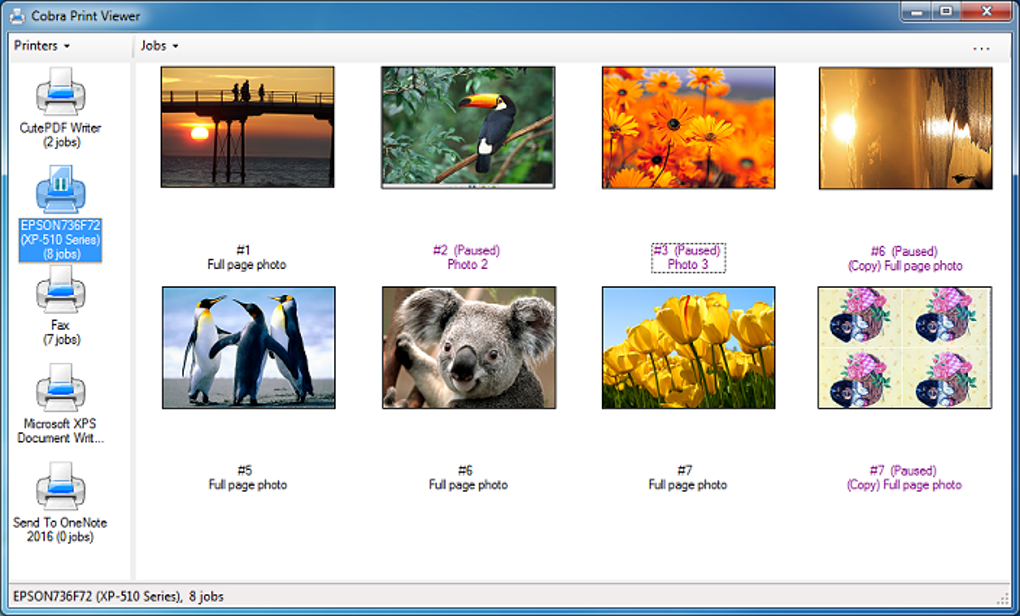
With Cobra Print Viewer, you gain instant visual access to the actual images of files in your print queue. Whether it’s a scanned document, a PDF, a photo, or a Word file, the tool renders a thumbnail preview of each pending print job. This allows users to quickly verify what’s about to print, avoid mistakes like printing sensitive documents by accident, or identify misformatted files before they’re sent to the printer.
What sets Cobra Print Viewer apart is its simplicity and efficiency. The software runs quietly in the background and doesn’t require complex setup. Just install it, launch the app, and you’re ready to go.
Its intuitive interface displays a clean, organized list of all pending print jobs with real-time previews. You can also see which printer is currently handling the queue, helping you manage multi-printer setups with ease. This makes it ideal for home offices, small businesses, and anyone who values time-saving tools.
Best of all, Cobra Print Viewer is completely free to download and use. There are no hidden fees, no trial limitations, and no intrusive ads. It’s a secure, lightweight application that respects your system resources. For users who want to enhance their printing experience without installing heavy software, this tool is a must-have. Whether you're printing invoices, reports, or personal photos, Cobra Print Viewer ensures you’re always in control.
Key Features That Make Cobra Print Viewer Stand Out
- Real-Time Thumbnail Previews – See actual images of files in your print queue, not just filenames.
- Multi-Printer Support – Easily monitor and manage print jobs across multiple printers.
- Lightweight & Fast – Minimal system resource usage; starts instantly and runs smoothly.
- Always-On Display – Keep the viewer window open for continuous monitoring.
- Free & Secure – No ads, no malware, no subscription fees.
- Simple Installation – No complex setup; just download and run.
- Compatibility with All Print-Ready Files – Works with PDFs, Word docs, images, and more.
One of the most appreciated features is the real-time thumbnail preview. Unlike other tools that require you to manually open files to check content, Cobra Print Viewer renders a visual snapshot of each print job as soon as it enters the queue. This is especially helpful when printing multiple documents in succession. You can instantly spot duplicates, incorrect pages, or corrupted files before they waste paper and ink.
The multi-printer support is another game-changer. If you have a setup with a desktop printer, a network printer, and a label printer, Cobra Print Viewer lets you monitor all queues from one place. You can quickly switch between printers and see exactly which job is next in line. This level of visibility reduces confusion and improves workflow efficiency.
For users concerned about performance, the software is incredibly lightweight. It uses minimal RAM and CPU, ensuring it won’t slow down your system—even during high-volume printing. The interface is clean and uncluttered, focusing only on what matters: your print jobs. You can resize the window, pin it to the desktop, or minimize it to the system tray for quick access.
Additionally, the tool is fully compatible with Windows 10, Windows 11, and older versions like Windows 7 and 8.1. It’s designed to integrate seamlessly with the native Windows printing system, so no additional drivers or configurations are needed. Whether you’re a student, freelancer, or office manager, Cobra Print Viewer adapts to your needs without compromise.
How to Install and Use Cobra Print Viewer on Windows
Installing Cobra Print Viewer is a quick and hassle-free process. Start by visiting the official Cobra Apps website and downloading the latest version of the software. The download is free, secure, and available in a single executable file (no installer required in most cases).
Once downloaded, simply double-click the file to launch the application. No installation wizard, no setup steps—just run it directly. The program starts instantly and begins scanning your active print queues. Within seconds, you’ll see a list of all pending print jobs with thumbnail previews.
For optimal use, keep the Cobra Print Viewer window open on your desktop. You can dock it to the side, resize it, or pin it to the taskbar for constant access. The interface is intuitive: each print job shows the filename, printer name, and a small image preview. Hovering over a file reveals additional details like file size and print status.
To manage your print queue, you can right-click on any job to cancel, pause, or resume it. This gives you full control without needing to open the Windows Print Management console. You can also filter jobs by printer or sort them by date, making it easy to find specific documents.
For advanced users, the tool supports keyboard shortcuts for quick navigation. For example, pressing “Ctrl + R” refreshes the queue, while “Ctrl + C” copies the filename. These small touches enhance usability and save time during repetitive tasks.
Regular updates are released to improve stability and add new features. You can check for updates manually through the app’s menu or enable automatic updates. Since the software is free, there’s no cost to stay current. This ensures long-term reliability and compatibility with future Windows updates.
It’s worth noting that Cobra Print Viewer does not require administrator rights to run. This makes it ideal for shared computers or environments with restricted user permissions. You can use it on both personal and business systems without IT approval.
Compatibility and System Requirements
Cobra Print Viewer is built specifically for the Windows operating system, making it a perfect fit for desktop and laptop users running Windows 7, 8.1, 10, or 11. It’s compatible with both 32-bit and 64-bit versions of these systems, ensuring broad accessibility across different hardware configurations.
The software has minimal system requirements. You’ll need at least 512 MB of RAM and 10 MB of free disk space. It runs on processors as low as a 1 GHz single-core CPU, so even older machines can handle it without performance issues. This makes it an excellent choice for legacy systems or low-end devices where resource efficiency is critical.
Unlike many third-party tools, Cobra Print Viewer doesn’t rely on external libraries or frameworks. It’s a standalone application that integrates directly with the Windows Spooler service, which manages print jobs. This direct integration ensures fast response times and reliable performance.
It supports all standard print formats, including PDF, DOCX, JPG, PNG, TIFF, and TXT files. As long as the file can be printed via Windows, Cobra Print Viewer can preview it. This includes documents from Microsoft Office, Adobe Acrobat, and various scanning applications.
While the software is currently only available for Windows, Cobra Apps has hinted at future releases for Mac and Linux. However, as of now, Windows remains the primary platform. For users on Android or iOS, alternative solutions may be needed, but for Windows users, this tool is unmatched in its niche.
Security is a top priority. The software is virus-free, tested by multiple antivirus engines, and distributed through a secure HTTPS connection. No telemetry or data collection is performed, ensuring your privacy remains intact.
Pros and Cons of Using Cobra Print Viewer
Pros
- Free to download and use with no hidden costs
- Provides instant visual previews of print jobs
- Extremely lightweight and fast
- Supports multiple printers and print queues
- Simple, intuitive interface with no learning curve
- Runs without admin rights or installation
- Regular updates for improved performance
- Secure, no ads, no malware
Cons
- Only available for Windows (no Mac or Linux version yet)
- Doesn’t allow editing of print jobs (only viewing and managing)
- Preview quality depends on original file resolution
- No cloud sync or remote access features
- Limited customization options for the interface
Frequently Asked Questions (FAQ)
Final Verdict: A Must-Have Tool for Windows Print Users
If you frequently use a printer and find yourself frustrated by the lack of visual feedback in the print queue, Cobra Print Viewer is the solution you’ve been missing. This lightweight, free tool brings clarity and control to your printing workflow, letting you see exactly what’s about to print before it’s sent to paper.
Its real-time thumbnail previews, multi-printer support, and seamless integration with Windows make it a standout utility. Whether you're managing a home office, a small business, or a shared workspace, this software saves time, reduces errors, and improves efficiency.
With no installation required, no ads, and regular updates, Cobra Print Viewer delivers exceptional value. It’s secure, reliable, and built with user experience in mind.
Download Cobra Print Viewer today and transform your printing experience—simple, smart, and free.







